Homework planner
A homework planner for every assignment and exam
Keep homework, projects and exams in one school agenda, organized by subject and due date. Plan in your browser or on iPhone, iPad and Mac, then check off completed work with the same account.
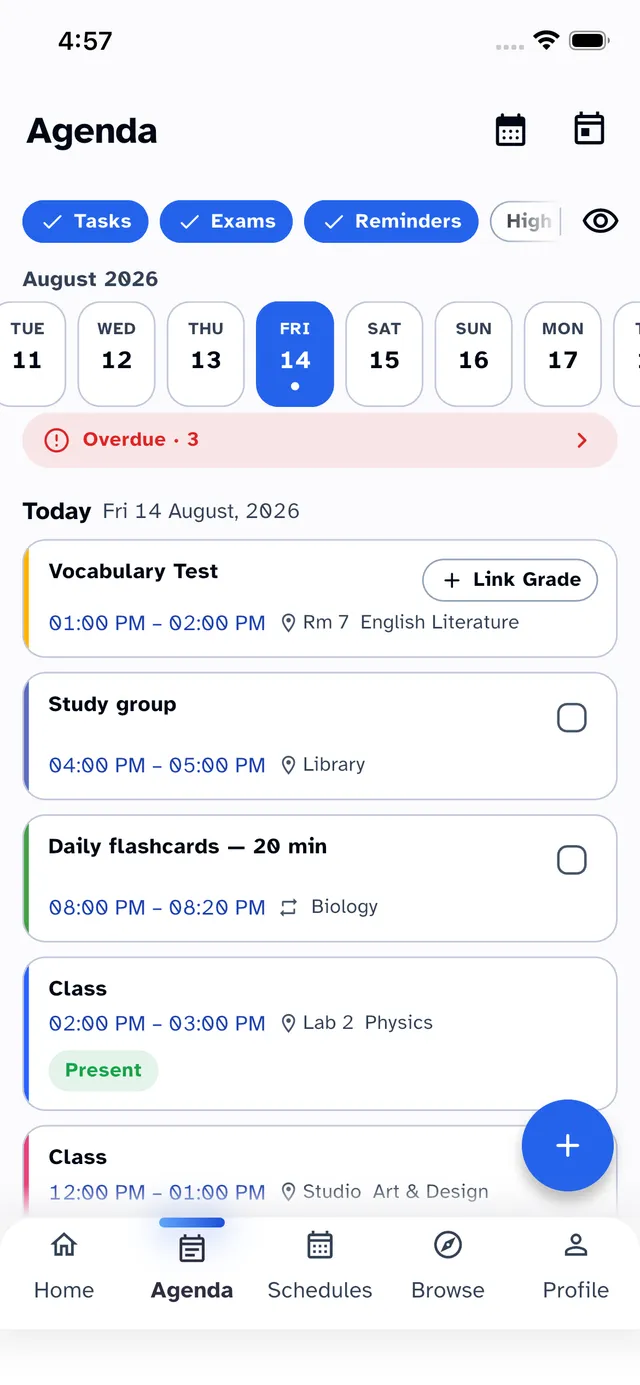
One agenda for everything due
Homework, projects, exams and personal reminders live on a single timeline next to your classes — so you always see what's due against the time you actually have.
Assignment reminders before the deadline
Set a reminder before work is due, rather than relying on a note in your bag. Overdue tasks stay visible until completed; Pro adds advanced reminder options.
Repeating homework & attachments
Reading log every Friday? Set a repeating task once. StudyWillow Pro also lets you attach worksheets, whiteboard photos and PDFs directly to assignments.
Homework on your home screen
StudyWillow Pro widgets show upcoming work and your next class on iPhone without opening the app. On a computer, use the web planner to review your agenda.

How to keep track of assignments
A planner is most useful when you update it before leaving each class. Start with a simple routine:
- Add each assignment with its subject and due date as soon as it is set
- Record exams separately so revision does not get lost among smaller tasks
- Review upcoming deadlines alongside your classes before deciding what to work on
- Check off finished work in the app or browser; use the installed app offline and sync when connected
Good to know
Homework planning questions
Can I use the homework planner online?
Yes. Open the StudyWillow web app in your browser and sign in. You can manage assignments on a computer and continue on iPhone, iPad or Mac with the same account.
Is the homework planner free?
StudyWillow is free to start with core timetable and assignment planning. Pro expands the limits and adds features such as attachments, home-screen widgets and advanced reminders.
Does StudyWillow remind me about homework?
Yes. Add a reminder before an assignment or exam is due. Overdue work stays visible until you complete it. Advanced reminder options are part of StudyWillow Pro.
Can I add recurring homework?
Yes — set any task to repeat daily, weekly or on custom days, ideal for standing assignments like reading logs or weekly quizzes.
Can I attach files or photos to assignments?
Yes, with StudyWillow Pro. Attach photos, PDFs and documents directly to tasks, exams and classes — the worksheet is always where the deadline is.
Does it work offline at school?
In the installed app, you can add and complete work without a connection. Changes sync to your other devices once you are back online.
Try StudyWillow free
Timetable, homework, grades, attendance and focus — one planner that does the whole job. Free to start, on iPhone, iPad, Mac and the web — Android coming soon.
Explore more of StudyWillow
Still comparing options for assignments and exams? See our comparison of school planner apps for homework, timetables and cross-device planning.